
Automated Claims Processing
Built-in validation catches errors before submission, so claims go out clean and your team spends time only on the cases that need attention.
PinkyBill helps practices process claims faster, generate comprehensive reports, and stay compliant with regulatory requirements — from the first appointment to the final payment.
PinkyBill replaces scattered spreadsheets, paper forms and manual fee lookups with one connected workflow. Every module shares the same patient and visit information, so forms and claims fill themselves in.
Built-in validation catches errors before submission, so claims go out clean and your team spends time only on the cases that need attention.
Submit claims electronically, on paper, by fax or by email — and track each method from a single dashboard.
Generate DFR, PR-2, PR-4, Med-Legal, RFA, SOAP notes, intake forms and more, auto-filled with the patient's and visit's details — or build your own templates.
Look up Official Medical Fee Schedule amounts instantly and price services consistently, without manual table lookups.
See claims grouped into 0–30, 30–60, 60–90 and 90–180 day buckets right on your dashboard.
Two-step login, per-user access to each module and a full change history help keep patient data protected.
Follow a single patient visit through PinkyBill.
Book the patient and choose the visit type. They're notified automatically by email, text or both.
Create the visit straight from the appointment and add the procedure and diagnosis codes.
Open Forms & Reports for that visit. DFR, PR-2, RFA and the rest come out auto-filled.
Send it electronically, on paper, by fax or by email — whatever the payer needs.
Watch claims, aging and tasks on your dashboard, then post the payment in Accounting.
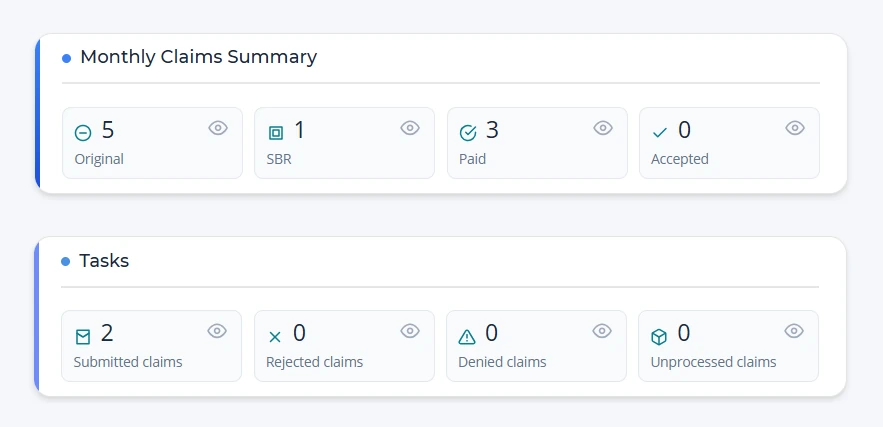
98941Chiropractic manipulation, 3–4 regions97140Manual therapyM54.50Low back pain, unspecifiedYour dashboard shows where each claim stands for the month, from submission through payment.
Keep patients informed, protect their information, and get help whenever your team needs it.
Schedule patients, follow each appointment from booking to check-out, and turn appointments into billable visits.
Patients are notified automatically whenever an appointment is scheduled or changed, and reminded again the day before.
Hello Maria Garcia,
Your appointment has been scheduled.
Date: 10/15/2026
Time: 9:00 AM
Visit Type: Follow-up
Rendering Physician: Dr. A. Rivera
Location: 123 Main St, Los Angeles, CA
Control exactly what each user can open, and see who changed what, so patient information stays protected.
Reach our team the way that suits you, and learn at your own pace with tutorial videos and the in-app training manual.
Pick a visit, choose a form, and PinkyBill fills in the patient, injury and visit details. Download it as a Word file, or save a draft and finish later.
Join the healthcare providers who trust PinkyBill for their claims management needs. Book a demo, or reach our team directly.

Protecting your account with an extra layer of security
Enter your email to reset your password

Enter the verification code sent to your email
Please set your new password
By using this website and OMFS calculator, users agree to the following terms:
The information, services, and tools provided are offered with the understanding that their use does not create a business, legal, or advisory relationship. PinkyBill does not provide legal, billing, or medical advice, and this tool is not intended to serve as a compliance or audit resource.
Although we make every effort to ensure the accuracy of our information, PinkyBill cannot guarantee that all OMFS calculations are correct, complete, or up to date. No warranties are made regarding the accuracy, completeness, or regulatory compliance of these calculations. All results are provided “as is,” and users assume full responsibility for verifying and applying them.
This OMFS Fee Calculator provides estimates only and is intended for informational purposes. It does not guarantee payment, coverage, or compliance under any workers’ compensation law or regulation. Fee results may vary based on case-specific factors, authorization requirements, payer policies, and ongoing updates to OMFS or DWC rules.
PinkyBill, its affiliates, partners, suppliers, and licensors shall not be held liable for any billing errors, claim denials, audit findings, penalties, or financial losses arising from the use of, or reliance on, the information generated by this calculator.
Click Agree to accept these terms and open the calculator.